
Modular storage is attractive when you want an initial battery system and a clear path to more capacity. For Freedom Won eTower, the first decision is identifying the generation and configuration being proposed. An existing e5000 system and a new eTower 2 proposal should each be checked against the documents that apply to them.
Current official documents describe six-module configurations. However, FWA's older product-page wording still refers to expansion to 20 kWh. That wording should not be treated as a universal eTower maximum. FWA product-page wording; FWA-linked eTower 2 overview.
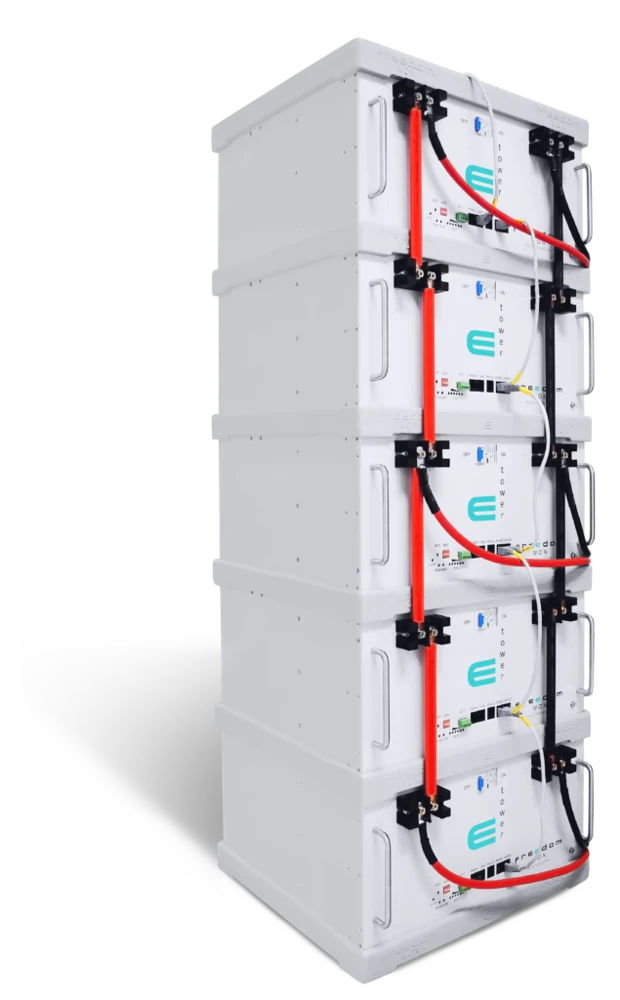
Product image: the five-module eTower stack shown on the Australian product page. Confirm the generation and approved module combination for your proposal.
Why do official sources show different capacities?
| Document | Published scope | Source |
|---|---|---|
| FWA legacy web copy | 5 kWh steps, expansion to 20 kWh | Product page |
| Archived e5000 overview | One to six modules; 5–30 kWh total-energy table | Manufacturer eTower sheet |
| FWA-linked eTower 2 sheet | One to six modules; 5–30 kWh total-energy table | Australian download |
| Manufacturer-hosted eTower 2 sheet | One to six modules; 5.12–30.72 kWh total-energy table | Manufacturer download |
Both eTower 2 PDFs carry a 4 September 2026 update date, yet their total-energy rows differ. The archived e5000 sheet also retains four-module wording elsewhere despite its six-column table. Six-module arrangements are available for assessment, but ask FWA to confirm the capacity and approved upgrade configuration for the equipment in your proposal.
For an existing installation, supply module labels, serial numbers, inverter details and commissioning records. Ask FWA to identify the correct manual and capacity description. Do not substitute a newer product's figures into the records for an older system.
Plan the next stage before buying the first
Write down what changes between the initial system and the expanded one. More overnight equipment, a longer operating day or a new work area can change energy demand and simultaneous power differently. A staged plan should show both.
| Stage | Assumed load and duration | Delivered-energy target |
|---|---|---|
| Initial requirement | 1 kW for 6 hours | 6 kWh |
| Expanded requirement | 1.5 kW for 8 hours | 12 kWh |
These are hypothetical constant loads with no solar contribution during the stated period. The calculations are 1 × 6 = 6 kWh and 1.5 × 8 = 12 kWh. They describe requirements at the loads, not recommended module counts. The expanded brief doubles energy demand while increasing assumed sustained power by half; losses and reserve must be added during design.
Request a proposal for each stage using the same assumptions. Ask what can stay in place and which inverter, mounting, connection or control components would need attention at the expansion stage.
Decide what would trigger the next stage
A useful expansion plan identifies the evidence that would justify adding capacity. For the illustrative six-hour initial requirement, ask what monitoring would show whether the selected loads are supported for the intended period. Record the starting charge, the actual operating hours and any contribution from another source. Those details make a later comparison with the original brief meaningful.
If the system does not support the intended period, have the installer assess why before specifying extra modules. Ask whether the issue relates to the selected energy window, available charging, a changed load schedule or a power limit. Extra storage should be evaluated against the identified constraint, not treated as an automatic response to every shortfall.
Keep likely future changes separate from changes already committed. A new appliance with known operating hours can be included in a defined second stage. An uncertain future requirement can remain a scenario for review. This gives FWA a practical basis for comparing an initial configuration with an expanded one without assuming that every possible future load will arrive.
Check output and accessories as well as module count
Power does not simply multiply by the number of modules. For example, the eTower 2 configuration ratings are 4.7 kW continuous discharge for one module and 8.4 kW for two. These are battery-table values, not a guarantee of equivalent AC output. Source: eTower 2 configuration table.
Include mounting and connection accessories in the equipment schedule. An itemised proposal should cover the mounting arrangement, communications and connection components for the whole configuration. Source: eTower 2 accessories and installation-method entries.
Compare the complete first and final configurations
Ask for two equipment schedules: what is included at the first stage and what the completed arrangement would require. Identify which mounting, connection and communication components can serve both stages and which need to be added or changed. The comparison should also identify any change to the inverter or controls, rather than describing the later work solely as a module purchase.
Review the proposed layout at its final size. Ask whether the chosen position still provides the access needed for assessment and servicing, and whether the delivery route accommodates the planned equipment. Have the designer identify the location requirements that apply to the selected generation. A drawing of the intended final arrangement makes these questions easier to resolve before the first stage is installed.
Discuss how the expansion work would be scheduled and commissioned. Ask what existing records the installer will need, what operating interruption is expected for the proposed work, and how the completed system will be checked against the revised load brief. These questions clarify the actual scope without assuming a universal upgrade procedure.
- Identify every existing and proposed module generation.
- Confirm the approved combination and applicable configuration table.
- Check the inverter model and required communications arrangement.
- Assess space, access and the final installed layout.
- Include commissioning and updated system records in the expansion scope.
eTower 2 supports backwards-compatible arrangements, subject to review of the existing modules, inverter and proposed configuration. Source: FWA-linked eTower 2 overview. Start that review with FWA inverter compatibility and the documents in downloads.
Keep a record that supports the next decision
At the first installation, request a record of the supplied module generation and serial numbers, the inverter model, the applicable document revision and the commissioned operating assumptions. Keep the load schedule used for selection with those records. Ask where the owner can find the monitoring information needed to assess the intended support period.
Before expansion, prepare an updated schedule showing what has changed. If the original example's six-hour requirement becomes eight hours, identify which loads now run longer and which are new. That is more useful than simply asking to double the battery size, because it allows the designer to assess energy, simultaneous power and charging separately.
After the upgrade, request a revised equipment schedule and the applicable capacity description for the completed combination. Have FWA confirm the capacity and power ratings for the combined generation and configuration. Keep these with the revised system records so future servicing or expansion uses the specifications of the equipment actually installed.
Compare expansion with your longer-term requirement
If the intended end state is already clear, compare a staged proposal with a configuration designed for that requirement from the beginning. The ENVA 16 guide offers another home and business starting point. Existing LiTE owners can use the LiTE selection guide; the kW and kWh guide helps define the load brief.
Ask Freedom Won Australia to review your eTower expansion plan. Include the existing equipment records and the next-stage load schedule so the advice addresses the actual system.
Frequently asked questions
Is the eTower expansion limit 20 kWh or 30 kWh?
The older FWA webpage says 20 kWh; official six-module e5000 and FWA-linked eTower 2 tables show 30 kWh. A manufacturer eTower 2 sheet shows 30.72 kWh. Confirm the applicable generation and rating.
Can I add eTower 2 to an older eTower system?
eTower 2 supports backwards-compatible arrangements. Have FWA review the existing modules, inverter and proposed combination before specifying your upgrade.
Will doubling the modules double the installed power?
Do not assume that. Use the configuration-specific battery limits, then check the inverter and complete system output. Increasing stored energy and increasing AC power are separate decisions.
What should an expansion proposal include?
It should identify both stages, the module generation, required accessories, inverter compatibility, commissioning scope and the approved specification revision for the completed arrangement.